
EMTP provides the option to protect a subcircuit using a user password. When a device is given password protection then it becomes necessary to enter the password when accessing the device from a library, accessing its contents or trying to edit its symbol. When the user enters the password once on a given computer then EMTPWorks remembers the unlocking of the device for the following sessions.
- Create your subcircuit (see Create a subcircuit).
- Once it is created, right-click on the subcircuit and select Edit Symbol.
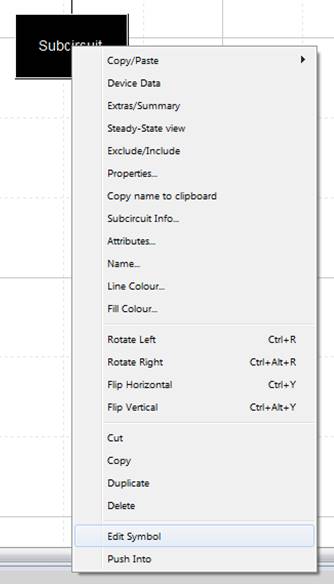
Figure 1: edit symbol
- The Symbol editor will open. In the menu bar, in Operations, select Subcircuit Password Protections
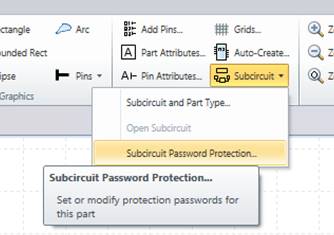
Figure 2: Symbol editor
- Enter the passwords in the relevant sections according if you want to restrain access, modification or both. Press OK.
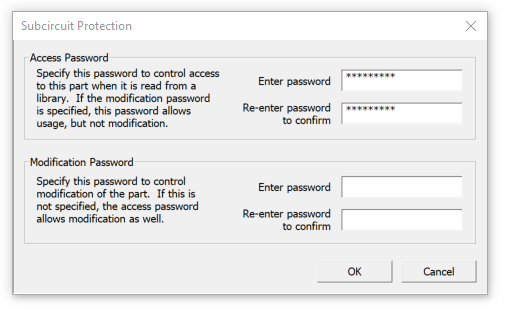
Figure 3: Subcircuit protection editor
- Save and close the symbol editor by closing the tab.
- Enter the password one more time to validate.
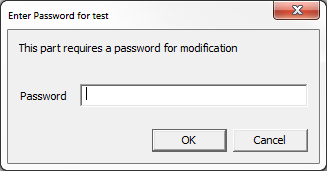
Figure 4 “enter a password” window
To remove password protection from a device it is necessary to access the above panel and remove (Delete) all password characters manually.
EMTP Technical support
support@emtp.com


